
One dashboard.
One API.
Multiple clusters.
One browser session manages containers and virtual machines, projects, networking, storage and identities across every LXD, Incus and MicroCloud cluster you run.


Your infrastructure stays distributed.
Your experience doesn't have to be.
One inventory of every region you run, and of the hardware inside each one.
Boundaries that follow teams across clusters, not the other way round.
The same screens and the same actions, whichever platform is underneath.
Every feature in the console is an API call, reachable with a scoped key.
One dense page, not a multi-step wizard.
Deploy a VM or a container,
as easily as on public cloud.
Type, source image, project, resources, storage, network, GPU passthrough, cloud-init, snapshots, security policies, migration settings and boot order are all visible on one page, rather than discovered three screens later.
The first decision on the page, and the only one that changes what follows.
Choose the node first and the page inherits its networks and pools.
By device on the target node, or by PCI address.
Collapsed by default, on the same page rather than a later step.
Networks, storage pools and GPU devices are read from the node you picked, so the page offers only what that node can honour.
Images already on the cluster, images from a remote image server, and images pulled on creation, all resolved by distribution, release, variant and alias.
The browser subscribes to the cluster event stream while the instance is built, so each step appears as the cluster reports it. Once it exists, the instance opens into a detail view with tabs for overview, configuration, devices and metrics.
A shell inside a machine
with no network.
Console and terminal reach an instance that has no SSH daemon, no open port and no public address, because they run over the cluster’s own WebSocket channel rather than over the guest’s network.
Both open as windows over the dashboard rather than as a page you navigate to, so several instances stay reachable at once while you keep working elsewhere.
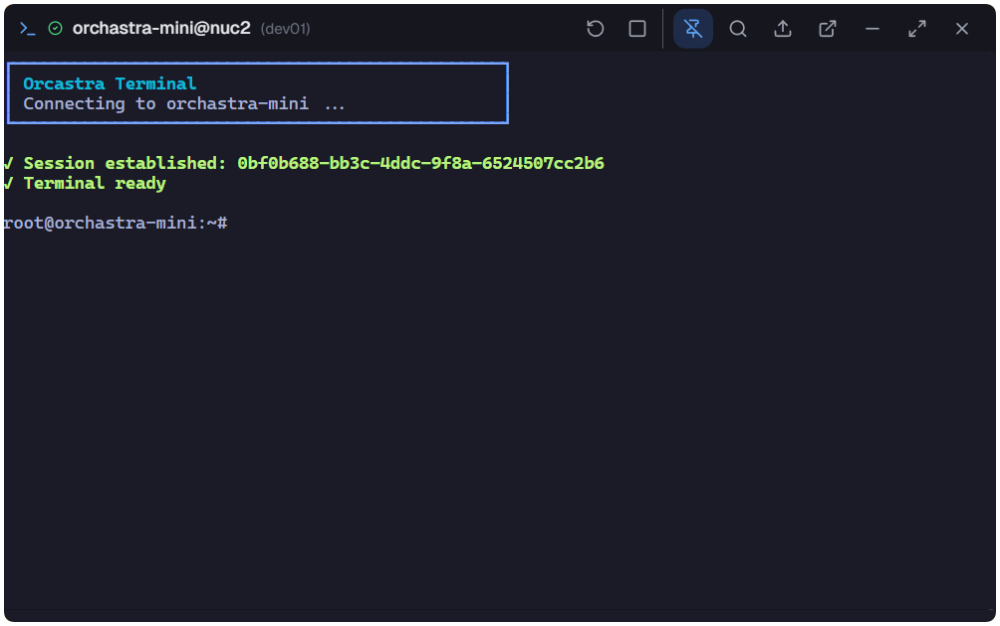
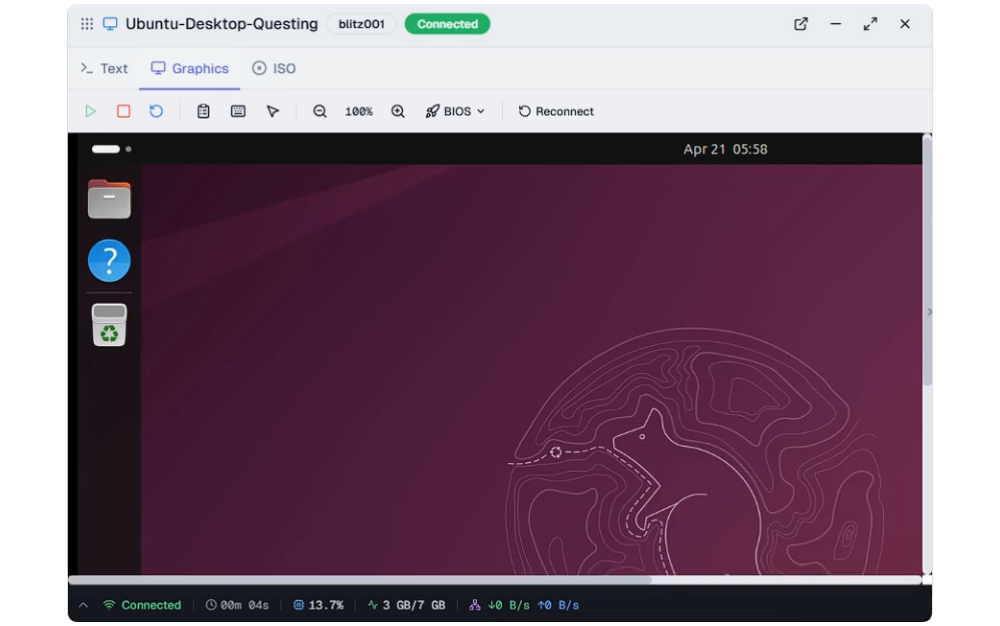
Open a terminal on one instance, a console on another, and both stay on screen together as separate cards.
Each session opens as its own card. Compare two instances side by side, or watch one boot while you work in another.
Move a card anywhere on screen and place the ones you are watching where you want them.
Change pages and the open cards stay with you. Reading a warning or a metric does not close the shell you are in the middle of.
Send a card to the bottom right corner to clear the view, and bring it back with the session still connected.
A real shell inside the instance, streamed straight to the browser. It is not SSH, so the guest needs no key and no open port.
A graphical console for virtual machines, right in the browser. Switch between text and graphics, or mount an ISO, from the tabs on the same window.
Drag a file onto the terminal window and it is pushed into the instance.
Every open session is tracked with its protocol, node, instance, duration and transfer rate, and kept in a searchable history after it ends.
The rest of the product, a page at a time.
Every part of Orcastra,
explained in full.
Each page carries one part of the product in full. Read them in order or jump to the one you came for; every page names the next at its foot.
Everything an instance depends on: virtual networks, storage pools and volumes, images, and the projects that hold them.
Register a cluster and watch its health, then see the whole estate by geography and aggregate capacity.
Roles from your identity provider, policies scoped to the resource, break-glass, and certificate lifecycle.
Live telemetry from the clusters themselves, and the durable record behind it.
Rebrand the console for the customers you put in front of it, and preview it before it applies.
The request path as it actually runs, the stack behind it, and what you need before installing.
Five situations, each mapping to features that exist.
Built for infrastructure
that stays entirely yours.
Service provider
Private cloud, sold to your own customers.
Organizations bound to clusters, tenant access policies per customer, project quotas that hold, and API keys your own portal calls.
Per-organization branding carries it the rest of the way: application name, tagline and footer text, accent colour and sidebar treatment, and a logo for light mode, dark mode and favicon.
Platform team
Internal infrastructure across several sites.
Regions with a hardware summary per site, live cluster operations and warnings, fleet monitoring, and an audit log that says who did it.
Hands-on recovery
The machine is broken and it has no network.
Open a graphical console into the virtual machine, attach an installer ISO, rebuild the root disk, and push a file straight in over the terminal.
Compliance-facing operations
Prove who reached what, and when.
Break-glass grants with written justification and a 24-hour ceiling, an activity audit log, searchable session history, and a log archive with age-based retention you can restore from.
AI integrated IT operations
Let the assistant read the fleet.
Orcastra publishes an MCP server, so the assistant your team already uses can query the estate through a key you scoped and revoke, recorded in the same audit trail as a person. No model runs here.
Abstraction that explains itself instead of hiding the machine.
LXD, Incus and MicroCloud,
orchestrated, not hidden behind a black box.
Orcastra turns independent clusters into a single managed estate. Every project, container and virtual machine is reachable from one place, governed by one policy and exposed through one API.
LXD, Incus and MicroCloud are the easiest virtualization platforms to install, operate and hand over. A few commands get you a working cluster, with no hypervisor licensing in the way.
Three platforms, one operating model. Pick per site, manage as one.
LXD
CANONICALKVM virtual machines and full-OS containers in a single platform, with no separate hypervisor stack to run.
Scheduled snapshots with automatic expiry, projects and profiles, and hardware passthrough for GPU, USB and NIC.
Unprivileged containers by default, plus UEFI SecureBoot and vTPM for virtual machines.
Image-based, with built-in stores for most Linux distributions and for Windows virtual machines.
LTS every two years, supported for five, with commercial support available through Ubuntu Pro.
MicroCloud
CANONICALA working cluster from four commands, with LXD, MicroCeph and MicroOVN wired together automatically.
Compute, distributed storage and software-defined networking without hand-assembling any of it.
Starts at a single node and scales to roughly 50, with high availability from three members up.
Snap packaging keeps components isolated and security updates streamlined.
Runs on production servers or lightweight edge hardware, on Ubuntu Server or Ubuntu Core.
Incus
LINUX CONTAINERSCommunity-governed fork of LXD, Apache 2.0 and free of any CLA.
Maintained by the same engineers who originally built LXD.
A complete REST API, so anything the client does an application can do too.
Scales from one laptop instance to a full rack, containers and virtual machines on the same storage and network.
Migration path from an existing LXD estate via lxd-to-incus.
Every layer named, from the click to the kernel.
Every action in the console names the cluster it touches and the API call it makes. Engineers learn the platform by using it, and can still drop to lxc or incus on the node at any moment.
Every console action shows the API request it sends and the underlying lxc/incus command it maps to.
The audit trail names the operator, the target cluster and the exact payload.
We don't want to take over
your backend.
Orcastra sits on top of LXD, MicroCloud and Incus. Nothing is forked, nothing is hidden, and every cluster keeps working the day you turn Orcastra off.
$ curl -s http://<host>:8765/health          200 OK

$ docker compose -f docker-compose.prod.yml ps
NAME                            STATUS         PORTS
orcastra-dashboard-backend      Up (healthy)   8765->4050/tcp
orcastra-dashboard-frontend     Up (healthy)   4321->2025/tcp
orcastra-dashboard-postgres     Up (healthy)   5432->5432/tcp
orcastra-dashboard-redis        Up (healthy)   6381->6379/tcp
orcastra-dashboard-fluent-bit   Up (healthy)

# stop all five and your clusters carry on without them
$ lxc list --project platform
Backend, frontend, PostgreSQL, Redis and a log shipper. Each reports its own health, and the backend answers a plain HTTP health check.
Generate a TLS certificate for yourself and drive the cluster with the native client, with no operator in the loop.
Registering a cluster adds a reader, not a rewrite. Stop the stack and every instance, network and volume keeps running exactly as it was.
Run it yourself.
Sell what it runs. Get help when you need it.
Orcastra is one part of ORCA. The same team runs a marketplace for the capacity it manages, a services practice behind it, and a programme for campuses.
List your clusters on OrcaHub
Providers that run Orcastra can publish resource pools on the OrcaHub marketplace, where developers pick a location and deploy.
Production support from ORCA
Orcastra is free to run alone. When you need an SLA, architecture work or an integration, ORCA Cloud Services is the team behind the software.
Campus clouds, built together
The Early Bird programme helps Indonesian universities turn campus servers into a campus cloud with Orcastra.
Keep the infrastructure.
Run the control plane yourself.
Orcastra is self-hosted and deployed with Docker, licensed GPLv3 with a public repository. There is no hosted service to sign up for.
  docker                            required
  lxd / incus / microcloud nodes    api enabled
  client certificate                one per node
  hashicorp vault                   required
  authentik                         required
  opensearch                        optional
Latest from Orcastra
All updates →Hotfix on top of Release Candidate 4 for deployments that manage a MicroCloud, verified against a real three member MicroCloud with OVN and an isolated project.
Release Candidate 4 for the Orcastra dashboard, including tighter authorization on cluster and resource IDs.
Instance lifecycle: creation, deletion, and rebuild, with crash-safe custom-image imports - Custom ISO and image upload, including resumable upload sessions - Virtual network creation and a topology view - Instance tagging, and searchable cluster and node pick